

Ledger recently launched its newest model, the Ledger Nano Gen5. This device is the latest version of their popular smaller signers (Nanos). It brings a lot of the high-end features from their more expensive models, like the Flex and the Stax, but puts them into a more compact and, honestly, a much more affordable package.
I’ve been using it for a while now, and I’m going to break down everything that truly matters for your day-to-day use. So, in this Ledger Nano Gen5 review, we’ll look at the price, the security chip, the user experience, and even how it stacks up against the other models.
Ledger Nano Gen5 Signer Quick Summary
| Product Name | Ledger Nano Gen5 |
| Positioning | “The most playful signer yet”: secure touchscreen signer for assets, logins & life |
| Connectivity | USB-C, Bluetooth 5.2, NFC |
| Display | Monochrome E Ink touchscreen, scratch-resistant glass, anti-glare coating |
| Security Chip | ST33K1M5 Secure Element, certified CC EAL6+ |
| Supported OS / Devices | Desktop: Windows 10/11, macOS Big Sur/Monterey/Ventura, Ubuntu 20.04/22.04 (x86) Mobile: iOS 15+ / Android 10+ |
| Size & Weight | 79.4 mm × 53.3 mm × 8.6 mm ; 46 g |
| Finish / Build | Plastic frame and back |
| In-Box Contents | Device, USB-C → USB-C cable, 3 recovery sheets, 1 Ledger Recovery Key, safety leaflet |
| Backup / Recovery | Includes Ledger Recovery Key (PIN-protected, encrypted) for faster recovery |
| Key Features | Clear Signing (transaction details on device), Transaction Check (anti-scam), Badge customisation by Susan Kare |
| Digital Assets Support | Supports thousands of coins and NFTs via Ledger Wallet app (15,000+ cryptos explicitly supported) |
| Price (Launch) | US $179 |
| Ecosystem / Companion App | Works with Ledger Wallet (previously Ledger Live) for buy/sell/swap/stake/manage |
| Target Use Cases | Self-custody crypto, digital identity, logins/2FA, Web3, NFTs, staking |
| Certifications / Audit | Secure Element + Ledger OS architecture tested internally and externally |
| Form-factor Evolution | First Nano device with full touchscreen, bridging classic USB style to modern signer |
Note: Ledger is now calling their devices “signers” instead of “hardware wallets,” and their app “Ledger Wallet” instead of “Ledger Live.” We’ll stick to the new names, but essentially, a signer’s job is to sign transactions, not hold your crypto. Your crypto always stays on the blockchain, and your private keys stay locked inside this little device.
Ledger Nano Gen5 Review: What Is It?
The Ledger Nano Gen5 is a highly secure, EAL6+ certified cryptographic signer that finally brings a secure touchscreen, along with NFC connectivity, to the classic Nano form factor at an accessible price point of $179.
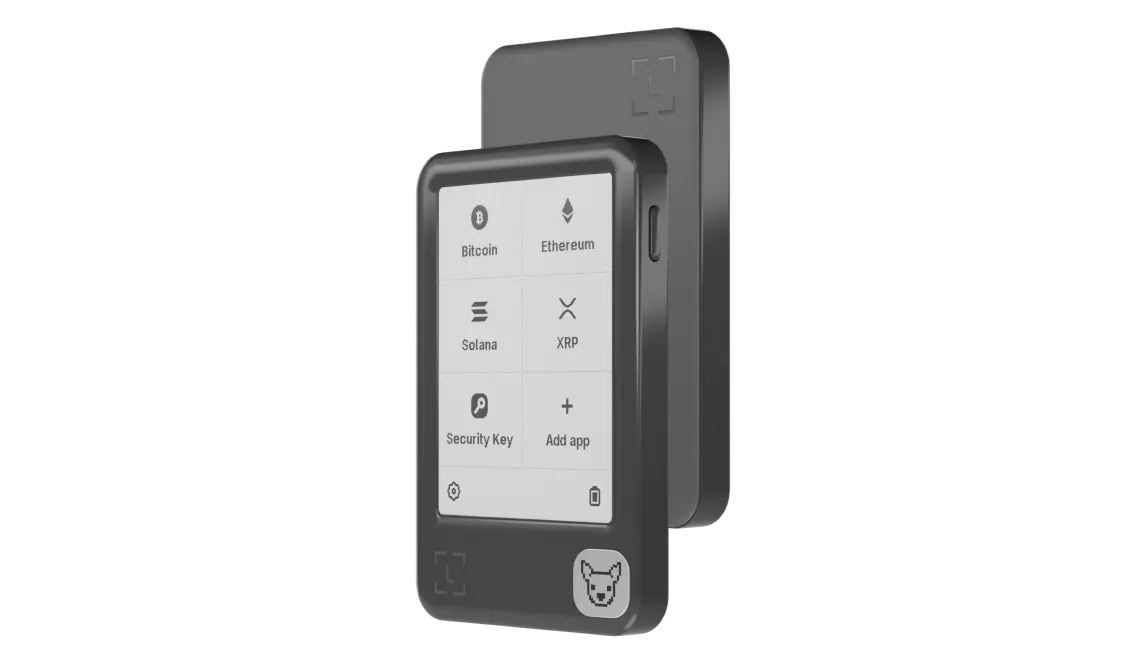
For years, people complained about the tiny, old-school display on the Nano X and Nano S Plus. You had to click those two little buttons a million times just to check a transaction, and it was kind of tedious. Well, the Gen5 fixes that entirely by including a bigger 2.8-inch E Ink touchscreen.
Hence, this makes reviewing and approving transactions, which Ledger calls “signing,” so much easier and clearer. The whole point of a signer is to prevent “blind signing”, where you approve something without truly seeing the details. The Secure Screen on the Gen5 is a massive improvement for this exact reason.
The Gen5 is pretty much positioned as the middle ground: it’s more secure and easier to use than the older Nano X, but it’s quite a bit cheaper than the premium Ledger Flex. It supports over 15,000 coins and tokens, which is great, and it also handles things like Ethereum and Polygon NFTs natively within the Ledger Wallet app.
What’s New on Nano Gen5 Compared to Previous Nano Models
The Nano Gen5 brings a lot of new stuff to the table, so you might be wondering what’s actually new here compared to previous Ledgers (like the Nano X, Nano S Plus, or even the more recent Ledger Flex).
- A Fresh Design with Touchscreen: It has a wider body with a touchscreen E-Ink display covering the front. This is the first time a “Nano” device gets a touchscreen (before, only the premium Stax and mid-range Flex had touch E-Ink screens). You’ll notice the difference immediately – it feels like a mini e-reader device instead of a tiny flash drive. The monochrome E-Ink screen is high-contrast and easy to read in any light, and it’s pretty cool how it retains an image even when off (that’s how e-ink works, saving battery).
- Clear Signing & Transaction Check: New security features called Clear Signing and Transaction Check are built right in. Basically, whenever you’re about to approve a crypto transaction or smart contract, Gen5’s screen will show you all the details in plain language. This means you can double-check the address, amounts, and what the transaction will do, helping you avoid any hidden scams or malicious code. It’s a big improvement over older wallets, where sometimes you were kind of blindly trusting what you clicked on your computer.
- Wireless Everything (Bluetooth + NFC): Earlier Ledger models like the Nano X had Bluetooth for mobile, but the Gen5 not only updates to the latest Bluetooth 5.2 (more reliable, better battery usage) but also adds NFC (Near-Field Communication). So you can simply tap the device for certain interactions.
- Ledger Recover Key in the Box: Probably one of the most user-friendly new additions is that Ledger now includes a Recovery Key card right in the box with the Nano Gen5.
- EAL6+ Chip: Another pretty important change is the security upgrade. The Ledger Nano Gen5 comes with a new Secure Element chip that has a CC EAL6+ certification. Right now, this is one of the highest commercial security standards you can get. The older Nano X only had an EAL5+ rating. Even though both are super secure, the EAL6+ rating means the Gen5 is better equipped to handle even more advanced or really sophisticated physical and software attacks.
Ledger Wallet (Previously Ledger Live)

Ledger Wallet is the new name of Ledger’s companion app, and it’s an essential part of using the Nano Gen5. Don’t worry if you see “Ledger Live” mentioned somewhere; it’s the same app, just evolved and rebranded. This change came with some cool upgrades that generally make your life easier. So, what can you expect from the Ledger Wallet app?
- First off, Ledger Wallet is your all-in-one hub for managing crypto. You’ll use it to check balances, send and receive funds, and view your portfolio. The app also lets you view and send your NFTs (for example, your Ethereum or Polygon NFTs) and interact with DeFi protocols.
- The on-ramp/off-ramp within Ledger Wallet. The app now has a feature (through a partner) that lets you transfer money from your bank (or even part of your paycheck) directly into crypto in your Ledger. Essentially, you could set up a direct deposit that converts to a stablecoin and lands in your Ledger-managed account, without intermediate steps or fees that exchanges would take.
- You can also buy crypto directly, swap one coin for another across different chains, and even put your crypto to work by staking it to earn rewards. They’ve added more providers and ways to connect to decentralized applications (dApps).
Security Measures: Is Nano Gen5 Safe for Daily Use?
Yes, the Nano Gen5 is extremely secure, and it’s designed to protect your assets even if you use it every day on the go.
- Secure Element Chip (EAL6+ Certified): That’s a mouthful, but all you need to know is that it’s a highly secure, tamper-resistant chip, similar to what’s used in passports or credit cards.
- PIN Code and Self-Destruct: When you set up your Nano Gen5, you create a PIN. Every time you connect or turn on the device, you must enter this PIN to use it. If someone steals your device, they can’t get in without the PIN. And Ledger devices have a safety feature: after 3 wrong PIN attempts, the device will wipe itself to factory settings.
- Recovery Phrase + Recovery Key (Backup): Speaking of recovery, the Gen5 gives you two robust options to back up your wallet. The traditional way is the 24-word Secret Recovery Phrase – if you have that written on your recovery sheet and hidden somewhere safe, you can always restore your accounts on a new device if needed. The new way is the Ledger Recovery Key card, which is a hardware backup. This card, which comes with the Gen5, can store your secret in an encrypted form. To use it, you’d tap it to a new Ledger (or the same one if it reset) and enter the card’s PIN that you set. With either method, your backup is offline and in your control.
- Firmware and Transparency: The Nano Gen5 runs on Ledger’s proprietary OS (known as BOLOS). While not fully open-source (parts of it are closed due to the secure element’s NDA restrictions), Ledger has open-sourced a lot of their software and allowed independent scrutiny. The device firmware gets regular updates to patch any vulnerabilities (though serious security breaches have been extremely rare with Ledger devices).

Clear Signing = Safer Transactions
I have to emphasize how important the Clear Signing feature is for security. Daily use often involves interacting with new addresses or smart contracts, and that’s where people get tricked. The Gen5’s screen will show you exactly what you’re agreeing to.
For example, if a malicious dApp was trying to drain your wallet, the Nano Gen5 might display “Giving permission to spend ALL your USDC!”, letting you realize “No way, I’m not approving that!” and reject it.
In the past, without clear signing, you might just see a random hex string or a generic message and accidentally allow something bad. This feature literally helps you not get scammed. Using the device daily, you’ll develop a habit of quickly reviewing details on that crisp screen. It only takes a few seconds, and it’s absolutely worth it.
User Experience
The move to the 2.8-inch touchscreen makes the Nano Gen5 a really comfortable and intuitive device to use, though you might find the slightly smaller storage capacity a bit annoying sometimes.
The user experience on the Gen5 is actually a massive step up from the older models. If you have ever used a Nano X, you know how frustrating it could be to use those side buttons. The touchscreen changes everything. Navigating through the device’s menus, scrolling through your apps, and most importantly, reviewing the transaction details, is now just a matter of tapping and swiping, kind of like using an e-reader.
The screen is an E Ink display, which is the same technology used on Kindles. It is monochrome, so no color, but it’s super clear and easy on the eyes.
It is really energy efficient, which helps the battery last longer. Speaking of the battery, it is rated for up to 10 hours of intermittent use. That’s pretty good, and it’s better than the battery life on the older Nano X.
Connectivity is another plus. Having USB-C is standard, but the addition of NFC is a smooth move, especially for mobile users. If you are using the Ledger Wallet app on your phone, you can just tap the Gen5 to instantly connect and verify a transaction, which speeds things up a lot.
Now, for a little negative: the storage capacity. The Nano Gen5 has 1.5MB of storage space for installing coin apps. The older Nano X actually had 2MB. This difference, although small in numbers, can be a bit of a hassle if you manage a really large and diverse portfolio.
You might find yourself needing to uninstall and reinstall apps for different coins if you run out of space. You can always reinstall an app without losing your crypto, since your keys are safe, but it’s just kind of inconvenient. Ledger should have probably made the storage bigger, not smaller, on the new model.
They also added some fun, customizable features, like being able to use little badges designed by the famous Susan Kare, the person who designed the original Apple Macintosh icons. It’s a nice touch that makes the device feel a bit more personal, which Ledger is trying to push with their “Proof of You” concept.
LEDGER Nano Gen5 vs. Nano X: Should You Upgrade?
The Nano Gen5 is basically the superior choice for security and daily use thanks to its touchscreen and EAL6+ rating, making it a compelling upgrade over the older Nano X, despite the small storage downgrade.
Let’s look at the specs side-by-side:
| Feature | Ledger Nano X (Older Model) | Ledger Nano Gen5 |
| Price | ~$149 | ~$179 |
| Security Chip | CC EAL5+ | CC EAL6+ (Highest available) |
| Screen | Small (128×64 px) OLED, Button-only | Large (2.8-inch) E Ink Touchscreen |
| Connectivity | USB-C, Bluetooth | USB-C, Bluetooth, NFC |
| Storage | 2MB (Supports up to 100 apps) | 1.5MB (Supports many apps, but less storage) |
| Signing | Buttons for verification | Secure Touchscreen + Clear Signing |
| Build | Metal casing (more premium feel) | Plastic casing (less premium, but lighter) |
Read our other articles related to Ledger:
- Ledger Flex review
- Ledger Stax review
- Ledger wallet review
- Ledger vs Trezor
- Best cold storage wallets
- Best hardware wallets
Final Verdict: Is Gen5 Worth It?
The Ledger Nano Gen5 is exactly the kind of upgrade the classic Nano series really needed, offering the perfect balance of top-tier security, modern usability, and a competitive price point.
Honestly, I can totally recommend the Ledger Nano Gen5 for pretty much everyone. Whether you are buying your first signer or finally upgrading from an old Nano S or Nano X, this device is a fantastic choice. The move to a secure touchscreen is the biggest game-changer here.
It just makes the whole experience of managing your assets, interacting with dApps, and reviewing complex transactions so much simpler and safer. That 2.8-inch E Ink screen is clear, and the ability to just tap to approve something is a million times better than using those tiny buttons.
The $179 price is really fair when you look at what you get: the highest available EAL6+ security rating, a touchscreen, and multiple connectivity options, including NFC.